Led an end-to-end agentic product enrichment platform rebuild
Project Summary
Ocula released its agentic e-commerce product optimisation platform as an MVP (Minimum Viable Product). I ran the redesign of the platform to take advantage of the product’s agentic nature and provide more flexibility, accuracy, and control for customers, as well as scalability for the business.
Introduction
Ocula provides a platform for large e-commerce customers to perform data enrichment and AEO (Answer Engine Optimisation) and SEO (Search Engine Optimisation) copy generation for their products at scale.
Problem
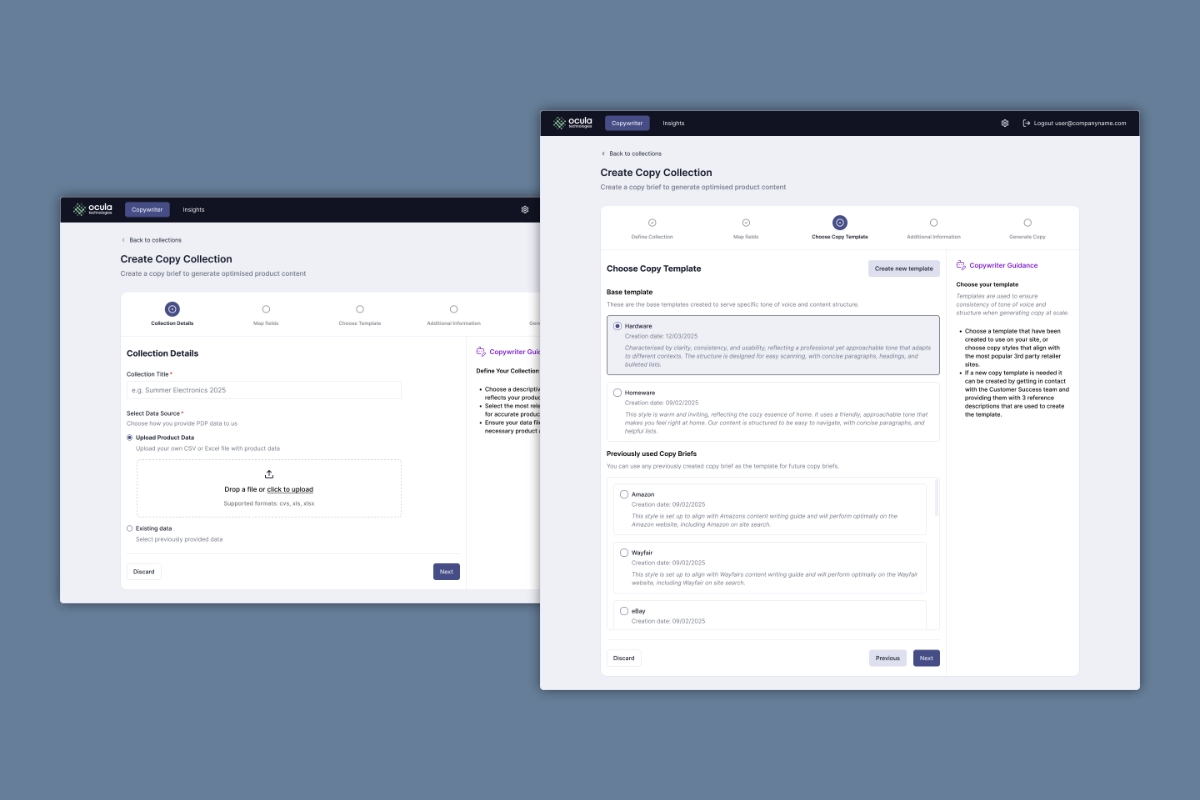
Ocula had released an initial MVP as a wizard-style stepper pattern. This worked well, but as we explored adding new features we quickly realised that the form factor limited what we could offer.
Customers were happy with the MVP, but some of the choices that we had made meant that it soon became difficult for customers with large product catalogues and multiple storefronts to manage their settings and configurations. This resulted in the customer success and solution engineering teams spending large parts of their days supporting these customers manually.
We needed to rethink how the product was designed to support flexibility and control.
Goals
- Provide an experience that makes the most of the flexibility of our agent, learn how customers use it, and develop tools to support those ways of working.
- Provide a way to create flexible copy generation rules which could be applied across categories, brands, storefronts and platforms.
- Reduce the review burden for users.
- Create a platform which would allow the business to add new features easily.
Challenges
-
Limited timeframe
We had new customers joining the platform, and we wanted them to join the new platform experience rather than switch shortly after joining.
-
Small team
I had a small four-person team to deliver this, which also included a front-end focused engineer, a back-end focused engineer, and a data scientist.
-
Balance user and agent actions
When designing the user journeys I encountered a new problem, working out which action should be done by the user and which by the agent.
-
Designing for probalistic journeys
Our UX strategy was 'ship-and-learn'. Due to the probalistic nature of agents we knew that edge cases would only appear once we shipped.
The Solution
The interaction design paradigm is an open-ended chat that drives a batch processing workflow. For users, this allows maximum flexibility to interact with the agent and perform operations at scale. For the business, this gives the flexibility to add features to the system with minimal UI overhead.
The Stack
To support the large amount of product data that the user needs to navigate, I came up with the concept of ‘The Stack’. The Stack is a side overlay panel that layers on top of itself to allow the user to dive deeper into the information without navigating to new screens. I created a UI panel slide-in animation that made the transition and the data load feel quicker and more natural than a basic slide-in navigation. I designed the panels so when they are layered in numbers, the layers are slightly offset, giving the user a visual indicator of how many layers deep they are in the data.
The Plan
To create and keep track of workflows, I created a ‘plan’ element.
It provides the user with a visual representation of the workflow they have planned as well as keeping track as they are progressing through it.
It has been designed to be highly flexible to support new features being added to the workflow easily.
Rules
Users create copy generation rules through the chat interface.
I designed this so the agent reviews every rule for accuracy, quality, duplication, and conflict before saving it, rather than allowing direct user manipulation.
QA Agents
To support customers reviewing enriched data attributes at large scales, we created an enrichment QA agent. The agent would perform confidence checks on the enriched data and flag any that were recommended for review. As part of this, I created a review component that would allow users to review the results and make decisions quickly.
We created a copy generation QA agent to support that step in the workflow. The agent would flag copy that had been generated that violated any of the relevant rules. I created a component that would highlight flagged copy, but also allow users to provide feedback and create additional rules based on any issues they found.
Prototyping
I prototyped this using a combination of sketches and Figma for initial page layouts, low-fidelity (not design-system aligned) prototypes in Lovable to test component patterns, and high-fidelity prototypes using Claude Code that we connected to customer’s existing data for testing.
For the high-fi prototypes I created, along with our front-end lead, a fully agent readable design system in Storybook.
Outcomes and Impact
- Reduced rule duplication across templates by about 60%, as of August 2026.
- Reduced the number of product content re-runs by about 75%, as of August 2026.
- Reduced the amount of manual support required by the customer success team and solution engineering teams from days per week to hours per week.
- Supported the delivery of a full new data enrichment feature that could be triggered and managed mostly through the chat interface.
“The interface is user-friendly, making it easy to review and validate product information at scale.”
E-commerce Manager, The Wedding Shop
Feedback and learnings
The chat nature of the platform meant that we could release features to customers faster, but it lacked affordances for users so the features were difficult to discover. Users told us they “missed their buttons”. Over later iterations, we gradually brought in more ‘clicky’ elements and we split interactions between the chat and more traditional UI elements.
The copy generation rules landed well - and highlighted the benefits of using chat as an interface where appropriate - as users could use natural language to describe the rules and the agent could interpret them and play them back.
As more customers onboarded to the product, we learned more about how customers structure their products differently. What is a multi-value attribute for one customer results in variant product SKUs (Stock Keeping Units) on another. We created a product catalogue feature that changed how the platform functioned significantly.